A Quick Refresher on the Two Shapes
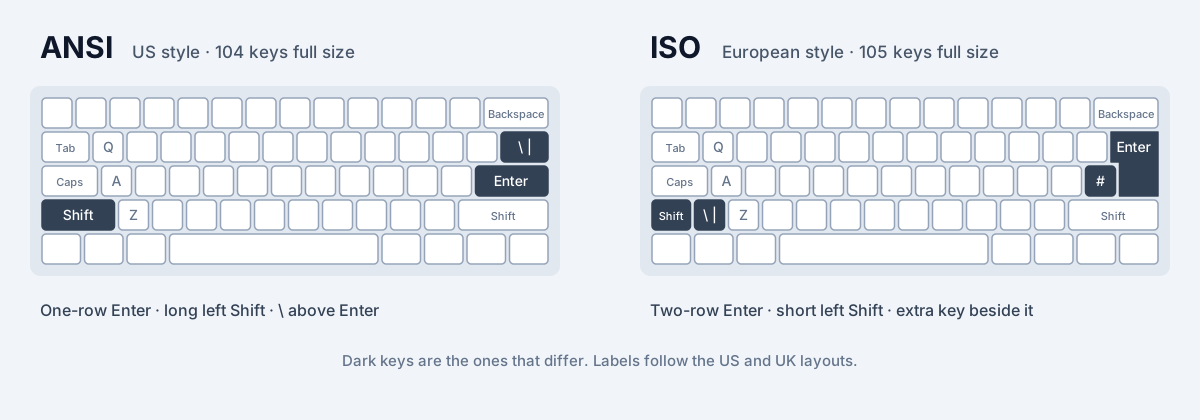
ANSI keyboards have a wide one-row Enter key, a long left Shift and a backslash key above Enter. ISO keyboards have a tall two-row Enter key, a short left Shift with an extra key beside it, and a key to the left of Enter. ISO has one more key than ANSI: 105 against 104 on a full-size keyboard, 88 against 87 on a tenkeyless one. ANSI vs ISO keyboards covers the details.
US QWERTY: ANSI
US QWERTY is the layout ANSI keyboards are designed around. Every key on an ANSI keyboard has a job on it, including the backslash above Enter. The US International layout, which adds accented letters through dead keys, uses the same ANSI keyboard.
US QWERTY also works on an ISO keyboard. The letters and most symbols stay in place, the key left of Enter types \ and |, and the extra key next to left Shift usually types \ and | as well, though what it types depends on the operating system. The key labels will not match if the keyboard was printed for another layout, which matters only if you look at the keys.
Learn or review it on the QWERTY layout page.
UK QWERTY: ISO
UK QWERTY uses the ISO shape, and it needs all 105 keys. The extra key next to left Shift types \ and |, the key left of Enter types # and ~, and the key at the top left types `, ¬ and ¦. On the number row, Shift+2 types " and Shift+3 types £, while @ moves to Shift and the ' key on the home row.
On an ANSI keyboard, UK QWERTY loses a key, so one character has no key of its own. On many systems that is \ and |, which then has to be typed another way. If you use the UK layout every day, an ISO keyboard is the comfortable choice.
AZERTY and QWERTZ: ISO
French AZERTY and German QWERTZ are ISO layouts, as are most other European national layouts, such as Spanish, Italian, Portuguese, Swiss and the Nordic layouts. They need the extra keys because they have more characters to fit: accented letters, umlauts, ß and extra currency and punctuation symbols.
On German QWERTZ, Y and Z swap places, ü, ö and ä take the keys to the right of P and L, and the extra key by left Shift types < and >. On French AZERTY, A and Q swap, Z and W swap, M moves to the home row next to L, the number row types symbols and accented letters unless you hold Shift, and the extra key also types < and >. In both, the backslash is typed with AltGr.
These layouts can be used on ANSI keyboards, but they lose a key, and < and > usually have to be typed another way. People who use them every day almost always use ISO keyboards.
Can You Use Dvorak or Colemak on an ISO Keyboard?
Yes. Dvorak and Colemak move letters around inside the main letter block, which is identical on ANSI and ISO. Every letter stays in the same place on both shapes, so your Dvorak or Colemak muscle memory carries over completely. What changes is the same as for anyone switching shape: the Enter reach, the shorter left Shift and the extra key.
Both layouts are most often used on ANSI keyboards, largely because they grew up around US English and US-made keyboards. That is why SureTyping assumes ANSI for Dvorak and the Colemak family until it sees an ISO key. Plenty of people in the UK and Europe type Dvorak or Colemak on ISO keyboards, and some operating systems include UK versions of both (Linux does, for example).
On an ISO keyboard, the extra key next to left Shift is not used by the original Dvorak and Colemak letter arrangements, so it keeps whatever the base layout put there. Practise on the Dvorak and Colemak layout pages and their lessons; the letters you learn are the same on both shapes.
Colemak-DH, Angle Mods and the Extra Key
Some modern variants do care about shape. Colemak-DH and similar layouts often include an angle mod, which shifts the left hand's bottom row so the fingers reach it at a more natural angle. On an ISO keyboard, the extra key next to left Shift gives that row somewhere to shift into, so the mod is simple. On ANSI there is no extra key, so ANSI versions rearrange the bottom row differently to get a similar effect.
That is why Colemak-DH is published in both an ANSI version and an ISO version, which place a few bottom-row letters differently. SureTyping teaches the ANSI row-stagger version of Colemak-DH. If you use the ISO version, the letters on the bottom left of your keyboard differ slightly from the lessons, and your operating system's Colemak-DH ISO layout is what you should practise on day to day.
How SureTyping Detects Your Keyboard Shape
SureTyping's keyboard shape setting has three options: Auto, ANSI and ISO. Auto, the default, works in two steps.
- It listens for the extra key. Browsers report the key between left Shift and Z as IntlBackslash, a key that ANSI keyboards do not have. The moment you press it, SureTyping knows your keyboard is ISO.
- Until then, it uses the shape your layout usually comes on. Every layout SureTyping teaches today, US QWERTY, Dvorak, the Colemak family and the other alternative layouts, usually comes on ANSI, so that is the starting point.
- The shape you pick, or the one Auto settles on, is used by every on-screen keyboard: the keyboard under the typing test, lesson keyboards, the AI Trainer and the keyboard layout pages.
How to Set Your Shape on SureTyping
Open settings and go to the Keyboard category, where your layout is set. Choose Auto, ANSI or ISO. The change applies to every on-screen keyboard straight away, and if you are signed in it follows you to other devices along with your other settings.
Choose a fixed shape when Auto would guess wrong. Common cases are US QWERTY, Dvorak or Colemak on an ISO keyboard (Auto assumes ANSI until you press the extra key, which these layouts rarely need), or practising for a keyboard you will use somewhere else. Once set, ANSI or ISO stays fixed until you change it.
Changing the shape never changes which letters you practise. To practise a different layout, change the layout in the same category, or use layout emulation to type it without changing your computer's settings.
Quick Reference
If you just want the usual pairing, here it is. Every layout below works on either shape; this is what you will most often find in shops.
- US QWERTY and US International: ANSI.
- UK QWERTY: ISO.
- French and Belgian AZERTY: ISO.
- German and Swiss QWERTZ: ISO.
- Spanish, Italian, Portuguese and Nordic layouts: ISO.
- Dvorak, Colemak and Colemak-DH: usually ANSI, often ISO in Europe.
- Japanese layouts: JIS, a separate shape with its own extra keys.