At a glance
| Factor | ANSI | ISO |
|---|---|---|
| Enter key | Wide, one row (home row) | Tall, two rows (upside-down L) |
| Left Shift | Long, reaches Z | Short, extra key before Z |
| Extra key by left Shift | None | Yes (\ | on UK, < > on German and French) |
| Key above or left of Enter | \ | above Enter | Key left of Enter (# ~ on UK) |
| Full size / TKL | 104 / 87 keys | 105 / 88 keys |
| Where common | United States, US English layout users | UK, Ireland, most of Europe |
Shape and Layout Are Two Different Things
People often use the word layout for two separate ideas. The physical shape is the hardware: how many keys there are, how big they are and where they sit. The layout is the software: which character each key types. Your operating system decides the layout, which is why you can switch a keyboard from QWERTY to Dvorak in a few clicks without touching the hardware.
ANSI and ISO are physical shapes. QWERTY, AZERTY, QWERTZ, Dvorak and Colemak are layouts. Any layout can run on either shape, but each region tends to pair a layout with a particular shape, so the two get mixed up. The guide on which layout goes with which shape covers those pairings in detail.
The names come from standards bodies. ANSI is the American National Standards Institute and ISO is the International Organization for Standardization. In everyday use, though, the names just describe two familiar key arrangements.
The Three Visible Differences
Put an ANSI and an ISO keyboard side by side and the letter keys line up exactly. The number row, the space bar row and the function keys are the same too. The differences are all around the edges of the letter block.
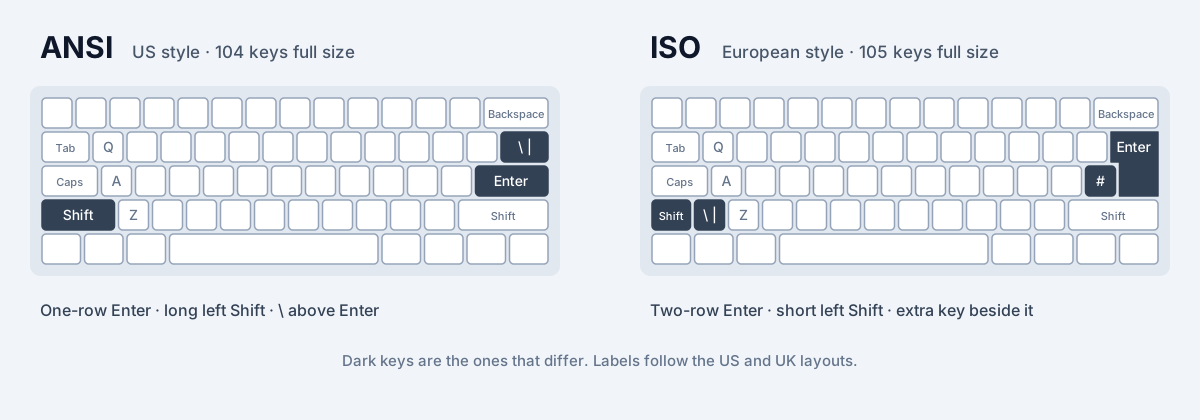
- The Enter key. On ANSI, Enter is a wide, flat key on a single row, the home row, at the end of A S D F. On ISO, Enter is taller and spans two rows, shaped like an upside-down L: wide on the top letter row, narrower on the home row.
- The left Shift key. On ANSI, left Shift is long and runs from the edge of the keyboard right up to Z. On ISO, left Shift is short, and there is an extra key between it and Z.
- The key above or beside Enter. On ANSI, the backslash key (\ and |) sits on the top letter row, above Enter. On ISO that space is taken by the top half of Enter, and a key appears on the home row just to the left of Enter instead. On a UK keyboard that key types # and ~.
Key Counts: 104 vs 105, 87 vs 88
Because ISO adds one key next to left Shift and swaps the backslash key for the key left of Enter, an ISO keyboard has exactly one more key than the matching ANSI keyboard. A full-size Windows keyboard with a number pad is 104 keys in ANSI and 105 keys in ISO. A tenkeyless (TKL) keyboard, which drops the number pad, is 87 keys in ANSI and 88 in ISO.
Smaller keyboards follow the same rule. Whatever the size, the ISO version of a board has one key more than the ANSI version. Some older or unusual keyboards differ, and laptops often squeeze or merge keys, but the one-key difference holds for standard boards.
Where the Extra ISO Key and the Moved Keys Sit
The extra key next to left Shift is the one people notice first, and what it types depends on the layout. On a UK keyboard it types \ and |, so the backslash has moved from the top right of the letter block to the bottom left. On German and French keyboards it types < and >.
The key to the left of the ISO Enter also depends on the layout. On a UK keyboard it is # and ~. On a German keyboard it is # and the apostrophe. On a French AZERTY keyboard it is * and µ.
Web browsers report these keys with fixed codes, which is how a typing site can tell them apart without guessing from the character. The extra key next to left Shift is reported as IntlBackslash. A US keyboard does not have that key at all, so a browser seeing it is strong evidence that the keyboard is ISO.
Which Regions Use ANSI and Which Use ISO?
ANSI is the standard shape in the United States, and it is common in many other countries where the US English layout is the usual one. Most keyboards built for the US layout are ANSI, including the keyboards of most laptops sold in the US.
ISO is the standard shape in the United Kingdom, Ireland and most of continental Europe, including Germany, France, Spain, Italy, Portugal and the Nordic countries. Spanish-language keyboards in Latin America are usually ISO as well. Canada uses both: English keyboards are often ANSI, while French and multilingual Canadian keyboards are usually ISO.
Japan uses a third shape, JIS. It has an Enter key shaped much like ISO's and adds several keys, including keys for switching input modes around the space bar, so it has more keys than either ANSI or ISO. This guide sticks to ANSI and ISO because they cover most keyboards outside Japan.
How Do I Tell Which Keyboard Shape I Have?
You can tell in a few seconds by looking at two places on your keyboard.
- Look at Enter. If it is a flat bar on one row, the keyboard is ANSI. If it is tall and covers two rows, the keyboard is ISO.
- Look between left Shift and Z. If left Shift runs all the way to Z, the keyboard is ANSI. If there is a small key between them, the keyboard is ISO.
- Check the backslash. If \ sits above Enter, you are almost certainly on ANSI.
Why It Matters for Typing Practice
Touch typing is muscle memory for distances. Your right little finger learns how far to stretch for Enter, and your left little finger learns how far to reach for Shift. On ANSI and ISO those distances are different, so habits built on one shape can misfire on the other.
Enter is the clearest case. On ISO, the part of Enter on the home row is narrower and sits one key further right, with the extra key to its left. An ANSI typist reaching for Enter on ISO can land on # instead. Going the other way, an ISO typist who aims a little high on ANSI hits the backslash key that sits where ISO's Enter would be.
Left Shift is the other common trap. An ANSI typist's little finger is used to a long Shift key. On ISO, the same reach can press the extra key and type a stray \ or <, which also leaves the next letter uncapitalised. These are small errors, but they are frequent, and they quietly lower accuracy until your hands adapt.
This is why an on-screen keyboard should match the keyboard you actually have. If you practise on ISO while the picture on screen shows ANSI, the picture teaches the wrong reach for Enter and Shift. Switching between ANSI and ISO has drills for retraining those reaches when you change keyboards.
How SureTyping Handles Your Keyboard Shape
SureTyping has a keyboard shape setting with three options: Auto, ANSI and ISO. It is in the Keyboard category on settings, next to your layout. Every on-screen keyboard on the site draws the shape you have: the keyboard under the typing test, the keyboards in lessons and the AI Trainer, and the pictures on the keyboard layout pages.
Auto is the default. If you press the extra key next to left Shift, SureTyping knows your keyboard is ISO. Until then it uses the shape your layout usually comes on. Every layout SureTyping teaches today (US QWERTY, Dvorak, the Colemak family and the other alternative layouts) usually comes on ANSI, so that is where Auto starts. If you have an ISO keyboard and want it drawn straight away, choose ISO yourself and it stays that way.
The letters do not move when you change shape. A QWERTY lesson teaches the same letter positions on ANSI and ISO; only Enter, left Shift and the keys around them are drawn differently.
Is ANSI or ISO Better for Typing?
Neither shape is faster in any meaningful way. Fast typists use both. ANSI's long left Shift is a slightly easier target, and its Enter starts one key closer to your little finger. ISO's tall Enter is an easier target if your finger tends to drift upward, and the extra key gives European layouts room for characters they need.
The better shape is usually the one that matches your layout and the keyboards you use most. If you type on a UK layout every day, an ISO keyboard puts every character where the key labels say it is. If you use US QWERTY, Dvorak or Colemak, ANSI is the common choice, though all of them work on ISO, as the layout and shape guide explains.