
Why a Beginner Might Choose Dvorak Over QWERTY
If you are early enough in your typing journey, you do not have years of QWERTY muscle memory to fight against. That makes a full-layout commitment feel more achievable than it does for an experienced typist who has to actively overwrite deeply ingrained habits.
The real benefit: you get to build one deliberate typing system from scratch rather than learning QWERTY first, reaching a plateau, and switching layouts later with extra friction. Beginners who choose Dvorak intentionally and follow a structured path often report that the layout starts to feel natural faster than they expected.
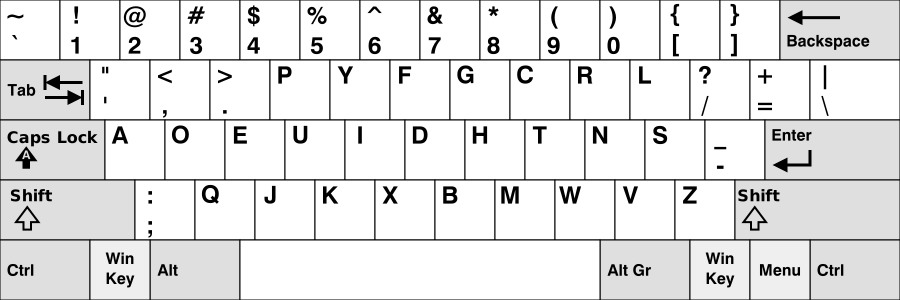
What Is Dvorak Actually Useful For?
Dvorak is most useful when you want a cleaner break from QWERTY and are willing to build a full personal typing system instead of a half-step migration.
It fits people typing mainly on their own machines, with enough patience to accept setup friction in exchange for a more deliberate non-QWERTY path.
- Best for dedicated personal-machine use rather than shared-device compatibility.
- Best for typists who prefer a full reset over an incremental migration.
- Best when the goal is building one intentional long-term layout and sticking with it.
Is Dvorak Too Demanding for Beginners?
Even without QWERTY habits to fight, Dvorak is not a shortcut. You still need repetition, patience, and a clear training structure. The layout only helps if you actually stay with it long enough for the key positions to become automatic.
The practical risk for beginners is not that Dvorak is impossible. The risk is choosing it without a training system and quitting during the frustrating early weeks before the gains have time to appear. SureTyping's lesson structure exists specifically to prevent that by making progress visible session by session.
When Dvorak Is the Right Call for a New Typist
Dvorak is a smart beginner choice when you are genuinely committed to deliberate, structured practice and you want to invest in one consistent typing system from the start rather than learning QWERTY casually and reconsidering later.
It is the wrong choice if you need fast compatibility across school devices, shared work computers, or public machines — or if you know you will not practice consistently. Compatibility friction is real and matters more for beginners still building baseline confidence.
How to Start Learning Dvorak on SureTyping
Use the Dvorak hub, begin with the starting track, and let accuracy lead the process. Do not judge the layout by raw speed in the first few sessions — accuracy stabilizing is the right early signal. Speed follows once the key positions stop requiring conscious thought.
Use SureTyping's AI adaptive trainer to drill specific keys that keep dropping — that targeted follow-up is what separates a beginner who sticks with Dvorak from one who gives up after a week of slow, frustrating typing tests.
- 1. Open the Dvorak hub and review the key layout before your first session.
- 2. Begin with Home-row foundations — do not skip to timed tests.
- 3. Run live lessons and track accuracy across sessions, not WPM.
- 4. Use the adaptive trainer to target specific weak keys before they become bad habits.
Should a Beginner Still Start with QWERTY?
If you need reliable compatibility across school devices, shared computers, and public machines, QWERTY is still the more practical beginner starting point. Compatibility matters when you are building baseline typing confidence and do not want layout friction adding to the challenge.
Dvorak becomes the stronger starting choice only when you are comfortable with that friction and genuinely committed to building one intentional system from the beginning — not as a casual experiment that you abandon the first time it feels slow.
How Dvorak Compares to Other Beginner-Friendly Alternatives
Dvorak is not the only alternative layout worth considering as a beginner starting point. Colemak is often described as the more beginner-friendly alternative layout because it retains more QWERTY key positions, reducing the volume of new patterns to learn at once.
For a beginner with no strong QWERTY habits, the difference is smaller than it would be for an experienced QWERTY typist. Both layouts require building new muscle memory from scratch. The meaningful distinctions are: Colemak has a shorter onboarding curve and better compatibility with standard shortcuts; Dvorak has a more radical design philosophy and historically larger community of dedicated practitioners.
If your goal is simply to start learning with a non-QWERTY layout, Colemak is the safer choice for most beginners. Dvorak makes sense when you specifically want the vowel-home-row design or you have a clear reason to prefer a more complete departure from QWERTY conventions.
What Does the Dvorak Learning Curve Look Like Week by Week?
Week one will feel disorienting regardless of your QWERTY background level. Key positions that should be automatic require conscious lookup. Typing anything meaningful takes noticeable effort. This is expected and not a signal that Dvorak is wrong for you.
By week two to three, the home row keys — particularly the vowels on the left side — should start to feel natural. Common short words involving A, O, E, and the home-row consonants will become recognizable chunks. Speed is still low but the layout starts to feel less chaotic.
Weeks four through eight are the consolidation phase. The full keyboard becomes navigable without looking, though not yet automatic. Common words and patterns start triggering as units rather than letter-by-letter searches. This is where consistent daily practice compounds most noticeably.
After two to three months of daily practice, most learners can type comfortably on Dvorak at speeds approaching or matching what a casual QWERTY beginner would reach in the same time. The major advantage of starting on Dvorak rather than switching later is that the layout never competes with QWERTY reflexes — the patterns build cleanly.
Common Mistakes Beginners Make When Learning Dvorak
The most common beginner mistake is practicing inconsistently. Switching between Dvorak and QWERTY during the early weeks — even briefly — slows consolidation significantly because the two layouts create competing muscle memory for the same keys.
The second common mistake is judging progress by WPM too early. Accuracy developing smoothly is the right early signal. Speed should be almost irrelevant in the first month — the goal is clean patterns, not fast ones.
- Do not mix Dvorak and QWERTY practice during the early weeks if you can avoid it.
- Do not compare your Dvorak WPM to your QWERTY WPM — they are incomparable during the transition.
- Do not skip the structured lesson path. Jumping straight to timed tests cements errors before patterns are stable.
- Do not quit during weeks two through four — this is when the layout feels worst and progress feels invisible, but consolidation is happening.