
At a glance
| Factor | QWERTY | Gallium |
|---|---|---|
| Default familiarity | Highest. You already use it on most devices. | Lower. Gallium is a newer alternative map and feels distinct from both QWERTY and the older mainstream ergonomic layouts. |
| Transition cost | None if you stay put, but gains come from practice quality rather than a layout change. | High enough to matter. Gallium generally needs a personal setup and a consistent retraining loop before it becomes trustworthy. |
| Who it fits | People who want immediate consistency across standard hardware and shortcuts. | People who want a newer balanced row-stagger layout and are willing to practice it deliberately. |
| Best SureTyping route | Use the main lessons roadmap and QWERTY layout hub. | Home-row foundations |
Should Most Typists Stay with QWERTY?
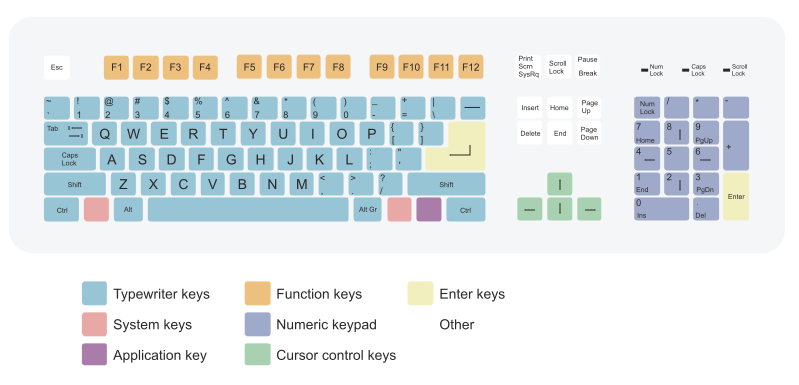
QWERTY is still the global standard for a reason: it is the layout on every shared keyboard, every office machine, and every laptop you will ever borrow. If your bottleneck is practice quality rather than layout ergonomics, staying with QWERTY and training more deliberately is almost always the higher-return move.
Switching layouts does not make your fingers faster. Consistent, deliberate practice does. On SureTyping, that means working through the structured roadmap, drilling your weakest keys in live lessons, and using accuracy-first sessions to build clean muscle memory on the layout you actually need in the real world.
Speed records are broken on QWERTY. Most professional transcriptionists type on QWERTY. The 2023 Aalto University analysis confirmed that the ceiling on QWERTY is not a layout problem — it is a practice problem.
What Is Each Layout Actually Useful For?
A useful layout comparison is not just about how hard a switch feels. It is about what each layout is genuinely good for once you use it in real life.
That practical lens is usually more helpful than treating every layout as a generic speed experiment.
- QWERTY: QWERTY is most useful when compatibility, transferability, and uninterrupted output matter more than trying a new keyboard theory.
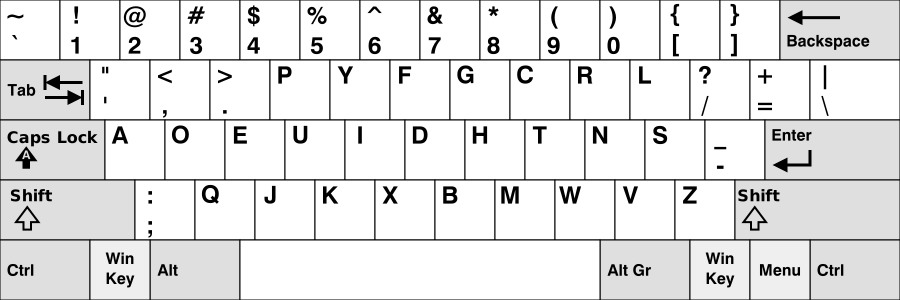
- Gallium: Gallium is most useful when you want a newer row-stagger-friendly alternative that balances comfort, fatigue, and modern layout metrics without chasing a single extreme.
When Is Switching to Gallium Worth It?
Gallium is a modern alternative with a cleaner row-stagger story than QWERTY, but it is still far enough away from the default board to demand deliberate practice.
The point of Gallium is not magic speed. The point is choosing a different training system and committing to it long enough for the switch to pay off. That means accepting weeks of slower typing before your new layout starts to feel natural.
Typists who succeed with Gallium share one trait: they treat the switch as a deliberate long-term project, not a shortcut. They set up a structured practice schedule, measure progress by accuracy rather than WPM in the early weeks, and do not flip back to QWERTY the moment a deadline appears.
How to Make the Right Choice for Your Typing Goals
Stay with QWERTY if you want transferability and immediate output. Move to Gallium if you want a newer alternative layout and are prepared to train it long enough for the balance benefits to matter.
Ask yourself two questions before committing to Gallium: First, can you tolerate two to four weeks of noticeably slower typing while the new layout settles in? Second, do you have a structured practice path lined up, or are you planning to wing it? If the answer to either is no, QWERTY with better practice habits will serve you more reliably.
If you are undecided, the most honest test is to open both layout hubs and run the first live lesson on each. Do not rely on abstract comparisons — feel the actual key movements you will be training and decide whether the difference is worth the investment.
How to Compare Both Layouts Step by Step
Use the QWERTY hub if you want immediate practice on the layout you already know. Use the alternative layout hub to see whether the switch feels structured enough to commit to before you invest real practice time.
The clearest signal comes from your accuracy in the first few live sessions — not from WPM. Accuracy tells you whether the new layout is starting to settle, and it is a much more honest progress metric during a transition than raw speed.
- Open both layout hubs and review the starting track structure.
- Run three to five live lessons on each path before deciding.
- Track accuracy — not WPM — as your early progress metric.
- Choose the layout whose transition cost matches your available practice time.