
Why Programmers Keep Looking at Programmer Dvorak
The appeal is direct: code is symbol-heavy, and Programmer Dvorak places many common punctuation characters — braces, brackets, slashes, equals signs — on the unshifted base layer. For developers who live inside editors, terminals, and markup files all day, that can reduce the constant shift-key overhead in a meaningful way.
The catch is that the symbol-row benefit comes bundled with a complete letter-layout retraining cost. You do not get the punctuation advantage for free — you earn it after rebuilding muscle memory for the entire board.
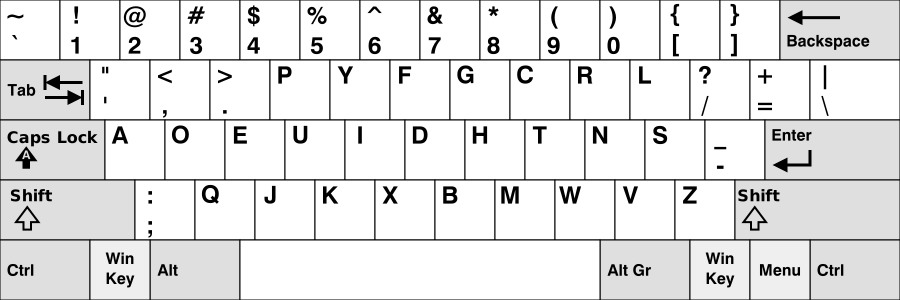
What Is Programmer Dvorak Actually Useful For?
Programmer Dvorak is most useful for coding, shell work, and markup-heavy editing where symbol access matters more to you than transition ease.
It fits personal development setups you control, especially if you spend long stretches in editors, terminals, or languages where punctuation rhythm matters as much as plain words.
- Best for symbol-heavy programming and terminal use on a personal machine.
- Best for developers who care about punctuation placement enough to relearn the board around it.
- Best when coding and markup are central enough that the symbol row deserves deliberate retraining.
When Programmer Dvorak Is a Strong Fit for Coders
Programmer Dvorak is worth considering when you type enough code each week to feel genuine punctuation friction, and you are willing to rebuild your typing system deliberately rather than testing it casually on the side.
The clearest sign it is a good fit: you care specifically about symbol placement, not just general ergonomics, and you can commit to a structured practice routine over six to ten weeks. SureTyping's Programmer Dvorak lesson path is built to make that transition trackable from day one.
- Good fit: developers ready to practice both letters and symbols systematically, with structure.
- Bad fit: developers who want punctuation benefits without accepting a full retraining period.
- Best use: pair the switch with structured lessons and targeted symbol drilling rather than guessing.
What Is the Real Coding Tradeoff with Programmer Dvorak?
Once the layout stabilizes, symbol-heavy work can feel more intentional and less interrupt-driven. The downside is that shortcuts, numbers, and ordinary text entry all feel different during the retraining window — and for programmers that window hits harder than for general typists.
The honest decision test: can you sustain deliberate practice for six to ten weeks without reverting to QWERTY every time a deadline appears? Use SureTyping's AI adaptive trainer to keep drilling problem keys instead of relying on passive exposure.
How to Evaluate Programmer Dvorak on SureTyping
Start with the Programmer Dvorak hub and opening track. Use the lesson keyboard preview to see exactly where the target symbols live before you remap anything. Run live lessons until the board stops feeling random — that is your baseline.
After the core lesson path, use targeted follow-up practice on the specific symbol sequences you use most in real coding work. Watching punctuation control improve across tracked sessions is a far more honest signal than deciding from theory alone.
What Do Most Programmers Underestimate About This Switch?
Most programmers do not underestimate the symbol-row benefit. They underestimate how long it takes for the rest of the board — the regular letter positions — to stop interfering with the coding flow they care about.
If you are going to make the switch, treat it as a complete system change from the start. If you are not truly committed to finishing it, improving QWERTY through structured lessons will almost always deliver a faster payoff.