
At a glance
| Factor | Colemak | Dvorak |
|---|---|---|
| Transition friction | Usually lower — more familiar key positions remain intact from QWERTY. | Usually higher — feels like a more complete remap with less carry-over. |
| Who it fits | Typists who want an ergonomic shift without a full identity reset. | Typists who want a fresh system and can commit to a deeper retraining window. |
| Daily work impact | Easier to blend into normal work while retraining — less productivity dip. | Heavier short-term cost — better suited to a dedicated retraining period. |
| Best starting point on SureTyping | Home-row foundations | Home-row foundations |
What Is Each Layout Actually Useful For?
A useful layout comparison is not just about how hard a switch feels. It is about what each layout is genuinely good for once you use it in real life.
That practical lens is usually more helpful than treating every layout as a generic speed experiment.
- Colemak: Colemak is most useful as an everyday alternative for people who want a more intentional letter layout without taking on the biggest possible switch cost.
- Dvorak: Dvorak is most useful when you want a cleaner break from QWERTY and are willing to build a full personal typing system instead of a half-step migration.
Is Colemak Easier to Adopt Than Dvorak?
If you still need to work, study, or ship things while changing layouts, Colemak is almost always the safer move. The switch is still real and requires genuine effort, but it tends to produce less total disruption than Dvorak because more familiar key positions carry over from QWERTY.
That makes Colemak a strong fit for people who want a more deliberate typing path without turning the next month into a full keyboard reboot. SureTyping's Colemak lesson track is designed to make the transition incremental rather than all-at-once.

Dvorak Rewards Commitment More Than Convenience
Dvorak makes more sense when you are ready to embrace a clean break from old habits. The transition is heavier, but for some typists it also feels cleaner — because you stop expecting partial QWERTY familiarity to save you and instead build a genuinely new system.
That approach usually works best when you have a structured practice plan and you are willing to let accuracy lead the process. Use SureTyping's AI trainer to keep drilling weak keys rather than hoping raw exposure time does the work.
How to Compare Colemak and Dvorak Using SureTyping
Skip the theoretical debate. Open both layout hubs on SureTyping, inspect the lesson tracks, and look at where the focus keys land on each layout — then run the first few live lessons on each path.
That gives you a more honest answer than any forum discussion, because you can feel which movement patterns you would actually have to retrain rather than imagining them in the abstract.
Which Layout Is the Safer Default Choice?
For most people switching from QWERTY, Colemak is the more practical default. It is easier to integrate into a normal daily workload while retraining — and that matters more than abstract layout elegance when you still need to be productive every day.
Dvorak becomes the better choice only when you actively want the deeper reset, have the time to absorb the heavier transition cost, and are willing to treat the switch as a deliberate long-term project rather than a casual experiment.
What Does the Research Actually Say About Dvorak and Colemak?
The research on alternative keyboard layouts is more nuanced than layout advocates usually acknowledge. The most frequently cited figure — that Dvorak reduces finger travel by 60% compared to QWERTY — comes from August Dvorak's own analysis in the 1930s and has been critiqued methodologically. More recent, independent studies show more modest improvements in finger travel distance: typically 20-40% reduction over QWERTY depending on the corpus of text used. The 2023 Aalto University analysis of over 136,000 typists found that layout choice was a weak predictor of speed compared to practice quality and consistency.
Colemak was designed in 2006 by Shai Coleman using modern letter frequency data and explicitly tried to retain familiar QWERTY key positions where possible. The official Colemak site documents how only 17 keys differ from QWERTY. Modern layout analysis tools (like the Keyboard Layout Analyzer) consistently show Colemak outperforming QWERTY on finger travel and same-finger bigram frequency — and performing similarly to Dvorak on most metrics, with lower transition cost. Dvorak, designed by August Dvorak and William Dealey in the 1930s, places all vowels on the left home row — a design philosophy documented extensively at dvorak-keyboard.com.
The honest conclusion: both Colemak and Dvorak offer measurable theoretical improvements over QWERTY. Neither offers the dramatic productivity gains their advocates sometimes claim. The decision between them is less about peak efficiency and more about which transition cost you can actually absorb.
How Colemak and Dvorak Handle Common English Patterns Differently
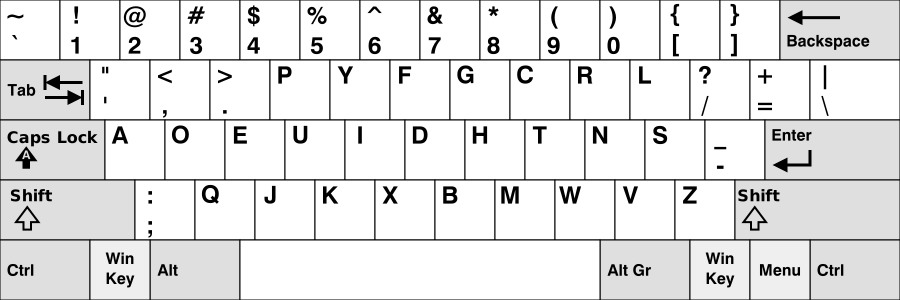
Dvorak places all five vowels on the left home row (A O E U I) and the most common consonants on the right home row (D H T N S). The design goal, as documented at dvorak-keyboard.com, was maximum home-row use and left-right hand alternation. This means common English words flow through alternating hands rather than being typed with one hand in bursts.
Colemak takes a different approach: as explained on colemak.com, it targets the most common English letter sequences and tries to place them on strong fingers in comfortable positions, while keeping QWERTY's key positions where they can be retained without compromising ergonomics. About 10 of 26 keys stay in the same position as QWERTY — mainly the bottom row, which lets shortcuts like Ctrl+Z/X/C/V stay familiar.
In practice, both approaches produce layouts that feel meaningfully different from QWERTY after a few weeks of training. The choice between them is more about which finger patterns feel natural to you than which one is theoretically superior on paper.
The Compatibility Question: Which Layout Causes Less Daily Friction
One underrated factor in the Colemak vs Dvorak decision is compatibility friction — the experience of using someone else's computer, logging into a remote server with a standard keyboard, or needing to type quickly in an environment where your layout is not active.
Both layouts create compatibility friction, but Colemak's larger QWERTY overlap means that short, simple input on a QWERTY keyboard is slightly less disorienting. Dvorak's vowel placement means even short words feel wrong on a QWERTY board. For people who frequently work across multiple machines or environments, this is a real practical consideration.
- Shared machines: both layouts require either mental switching or OS remapping — but Colemak has more QWERTY carry-over for emergency typing.
- Remote servers and CLI environments: OS-level remapping may not apply, affecting both layouts equally.
- Pair programming and team environments: both require a clear heads-up when using someone else's machine.